
macOS Terminal Feature Support Matrix
Every terminal emulator’s website lists modern features, and most of them are telling the truth about most of them. This page is the part in between: what six macOS terminals actually do with the escape codes your editor, prompt and image viewer send them, on the settings they ship with.
Ghostty and WezTerm handle nearly everything here. kitty misses only overline and sixel. iTerm2 draws sixel images but fakes three of the five underline styles. Alacritty is solid on text, falls over on complicated emoji, and draws no images at all. Terminal.app manages neither 24-bit colour nor any styled underline, and prints images on screen as text.
On Linux? The Linux feature matrix tests nine terminals the same way, from GNOME Terminal and Konsole to foot and xterm. The four that run on both systems give the same answers on both, bar a couple of font rows for Alacritty.
Feature support by terminal
Section titled “Feature support by terminal”| Feature | Alacritty | Ghostty | iTerm2 | kitty | Terminal.app | WezTerm |
|---|---|---|---|---|---|---|
| Colour | ||||||
| 24-bit colour (truecolor) | Yes | Yes | Yes | Yes | 1No | Yes |
| Text styles | ||||||
| Italic | Yes | Yes | Yes | Yes | Yes | Yes |
| Bold and italic together | Yes | Yes | Yes | Yes | Yes | Yes |
| Dim | Yes | Yes | Yes | Yes | Yes | Yes |
| Strikethrough | Yes | Yes | Yes | Yes | No | Yes |
| Overline | No | Yes | No | No | No | Yes |
| Underlines | ||||||
| Single | Yes | Yes | Yes | Yes | 2No | Yes |
| Double | Yes | Yes | 3Partly | Yes | 2No | Yes |
| Curly (undercurl) | Yes | Yes | Yes | Yes | 2No | Yes |
| Dotted | Yes | Yes | 3Partly | Yes | 2No | Yes |
| Dashed | Yes | Yes | 3Partly | Yes | 2No | Yes |
| Coloured underline | Yes | Yes | Yes | Yes | 2No | Yes |
| Characters | ||||||
| Emoji | Yes | Yes | Yes | Yes | Yes | Yes |
| Emoji skin tones | 4No | Yes | Yes | Yes | Yes | Yes |
| Flag emoji | 5No | Yes | Yes | Yes | 6Partly | Yes |
| Combined emoji (family) | 7No | Yes | Yes | Yes | Yes | Yes |
| Double-width CJK | Yes | Yes | Yes | Yes | Yes | Yes |
| Box drawing and blocks | Yes | Yes | Yes | Yes | Yes | Yes |
| Ligatures, default font8 | No | Yes | No | No | No | Yes |
| Nerd Font icons, default font8 | 9Partly | Yes | No | Yes | No | Yes |
| Images | ||||||
| Sixel | No | No | Yes | No | 10No | 11Yes |
| kitty graphics protocol | No | Yes | 12Partly | Yes | 10No | Yes |
| Hyperlinks and clipboard | ||||||
| Hyperlinks (OSC 8) | Yes | 13Yes | 13Yes | Yes | No | Yes |
| Copy to clipboard (OSC 52) | Yes | Yes | 14No | Yes | No | Yes |
| Protocols (the terminal's own answer) | ||||||
| kitty keyboard protocol | Yes | Yes | Yes | Yes | No reply | 15No reply |
| Synchronised output (mode 2026) | Yes | Yes | Yes | Yes | No reply | Yes |
| Bracketed paste (mode 2004) | Yes | Yes | Yes | Yes | No reply | Yes |
| Focus events (mode 1004) | Yes | Yes | Yes | Yes | No reply | Yes |
| SGR mouse reporting (mode 1006) | Yes | Yes | Yes | Yes | No reply | Yes |
| Grapheme clustering (mode 2027) | No | Yes | No | No | No reply | Yes |
| Light/dark mode query | No reply | Yes | No reply | Yes | No reply | No reply |
| Light/dark change notices (mode 2031) | No | Yes | No | Yes | No reply | No |
| In-band resize (mode 2048) | No | Yes | Yes | Yes | No reply | No |
| Colour queries (OSC 10/11) | Yes | Yes | Yes | Yes | Yes | Yes |
| Reports its name and version (XTVERSION) | No reply | Yes | Yes | Yes | No reply | Yes |
| Answers terminfo queries (XTGETTCAP) | No reply | Yes | Yes | Yes | No reply | Yes |
- Ignores 24-bit colour codes and reads their values as other attributes; a red gradient comes out as one flat teal band.
- Reads the colon form of these codes (4:3 for a curly underline) as a background colour, so styled text arrives in coloured blocks with no underline.
- Drawn as a plain single underline.
- Draws the thumb and the skin-tone swatch separately.
- Shows the two regional-indicator letters instead of a flag.
- Drawn, but given one cell instead of two, so it overlaps the next character and shifts the rest of the line.
- Draws the three people separately, three times the width.
- Depends on the font the terminal ships with as much as on the terminal: any terminal here can be given a font that has them.
- Draws powerline arrows itself, but no other Nerd Font icons.
- Prints the image data on screen as text.
- Clipped from the right when characters are printed immediately before the image on the same line. Images that start a line, or that follow a cursor move, are drawn in full.
- Draws the image but ignores the requested size: a six-by-one-cell image came out one cell wide and nine rows tall. It also leaves the protocol's support query unanswered.
- Shown only while Cmd is held.
- Off by default: Settings > General > Selection > Applications in terminal may access clipboard turns it on.
- Off by default; enable_kitty_keyboard = true turns it on.
Reading the matrix
Section titled “Reading the matrix”- ✓ works, ✗ doesn’t, and ◐ sort of works: the footnote says how.
- – means the terminal ignored the question. That usually means it lacks the feature, but not always: a terminal can support something and still not answer when asked about it.
- Every feature name is a link to its own row, for pointing someone at the one result that settles the argument.
Most rows record what turned up on screen. Hyperlinks and the clipboard record what happened when they were used, and the protocol rows at the bottom, for features that don’t draw anything, such as the keyboard protocol or synchronised output, record the terminal’s own reply when asked whether it supports them.
How the results were gathered
Section titled “How the results were gathered”Each terminal drew the same test pattern: colour ramps, every underline style, emoji, CJK text, box drawing and two small images. A screenshot of that is the evidence for every row from colour to images, and all six are below.
The rest were tried rather than looked at. For hyperlinks, each terminal drew a link above the same words without one, and the pointer hovered over each, with and without Cmd held: a terminal that changes something over the link and nothing over the plain words supports them. For the clipboard, each one was sent text to copy, and the clipboard checked afterwards. The protocol rows come from sending each terminal the standard queries and recording what came back. The results are also available as JSON, replies included, for anyone who would rather cite them than squint at a table. The data is licensed under CC BY 4.0: use it for anything, as long as you credit terminal.ninja.
Every terminal ran on its factory settings, with any configuration file ignored, and iTerm2 and Terminal.app on their built-in default profiles. That makes this a picture of what you get out of the box, which is not quite the same as what each terminal can do. WezTerm’s keyboard protocol is one setting away, and the font rows mostly measure the font each terminal ships with.
The screenshots
Section titled “The screenshots”Row B is row A forced into 256 colours, so a terminal that rounds 24-bit colour down draws A with B’s bands. The rulers mark where each emoji and CJK character should end.
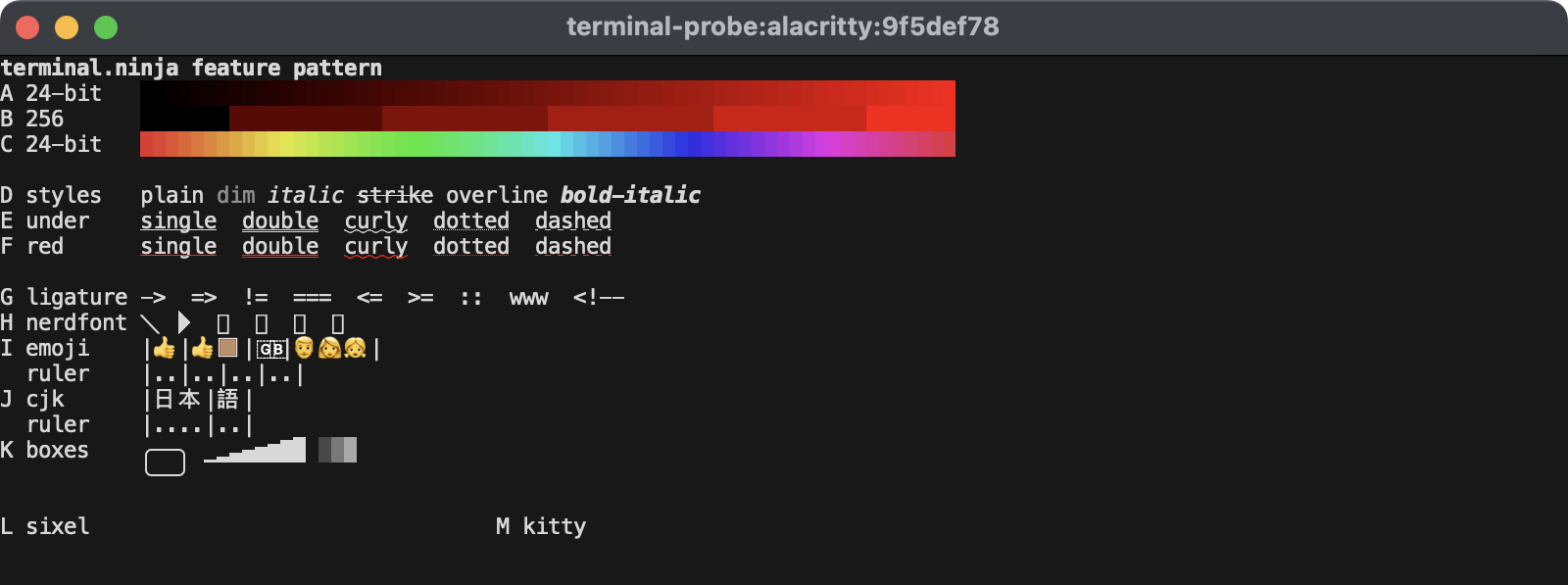
0.17.0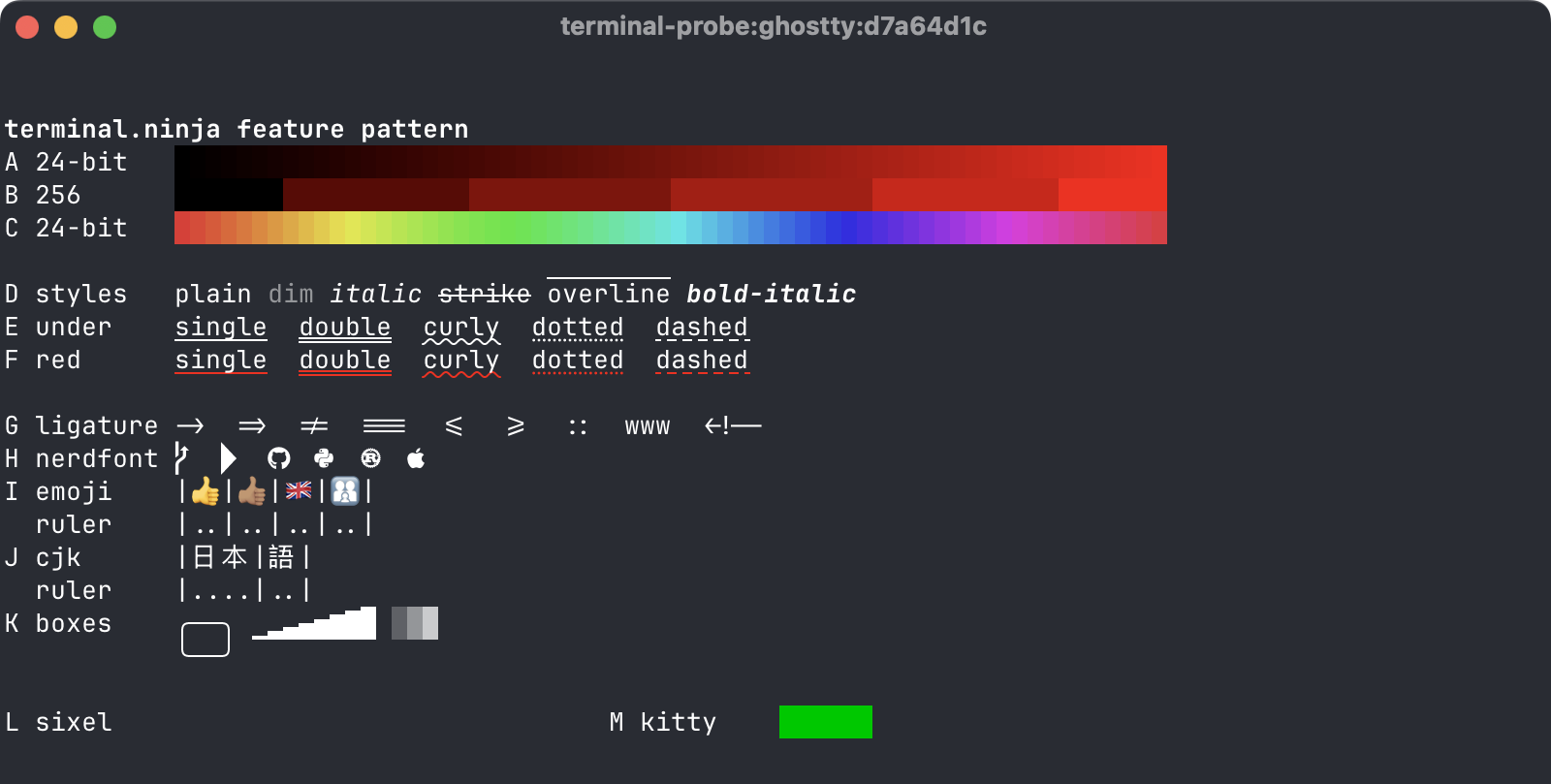
1.3.1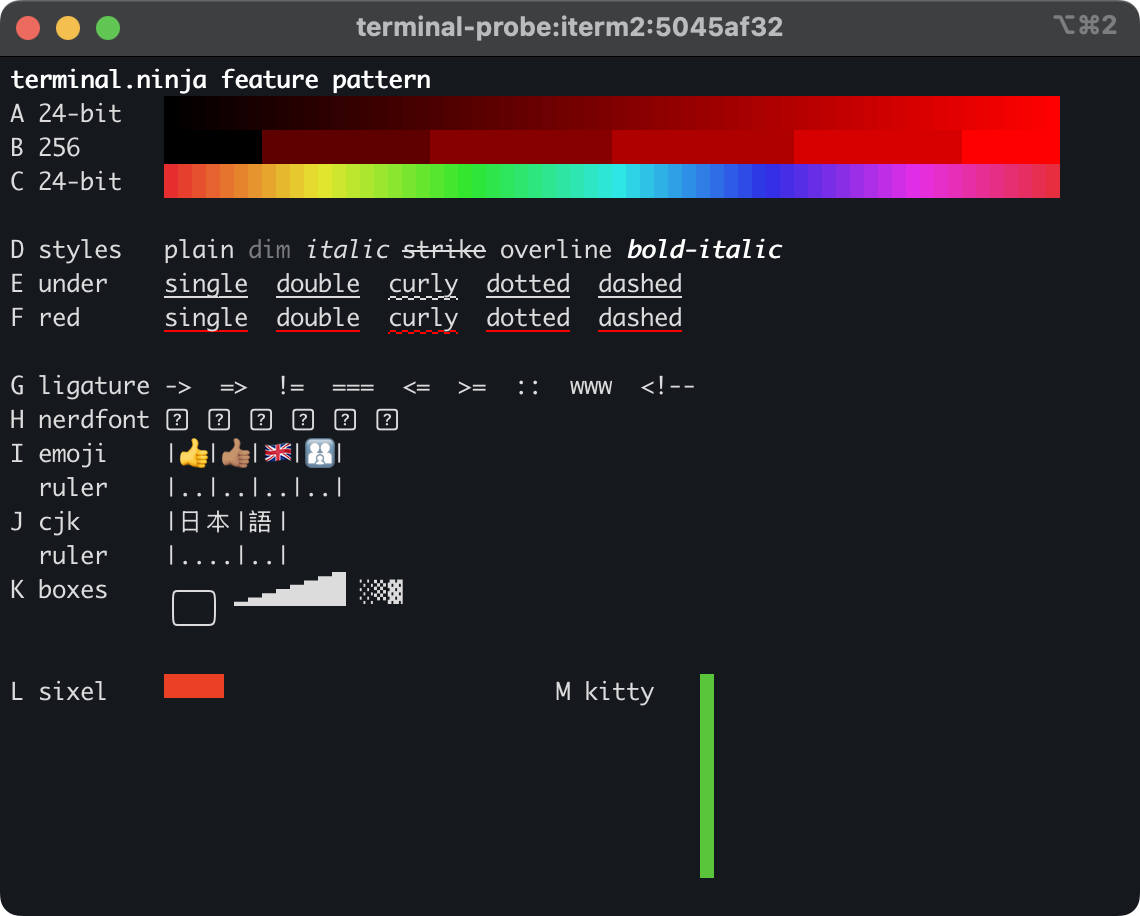
3.5.11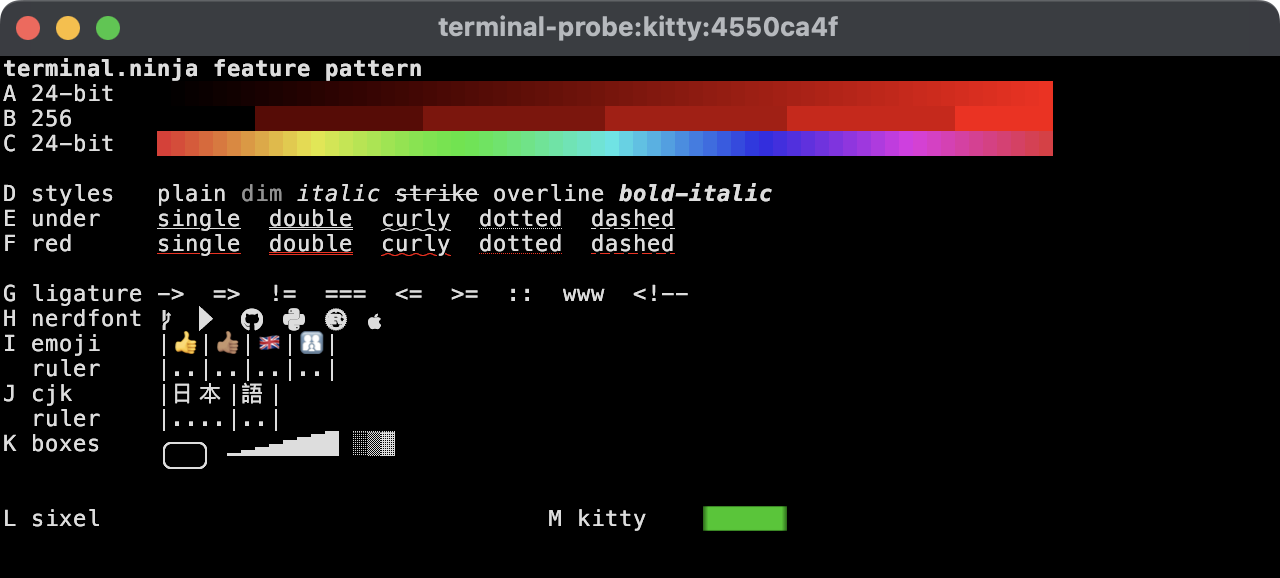
0.49.1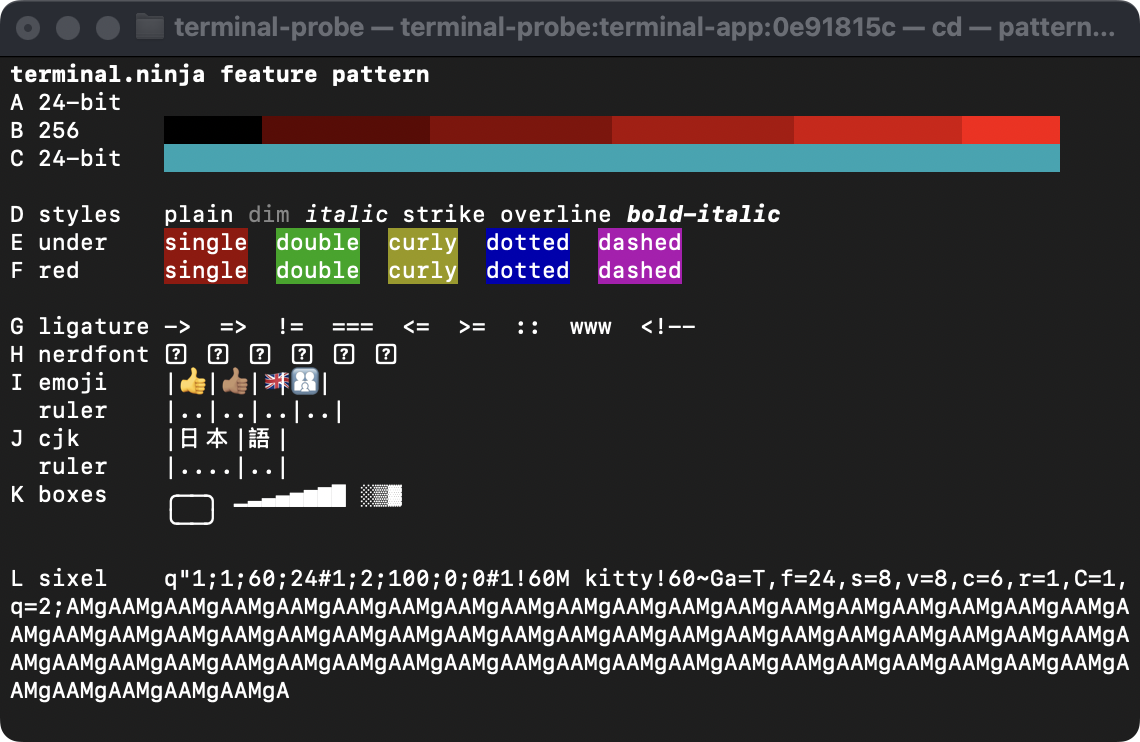
2.14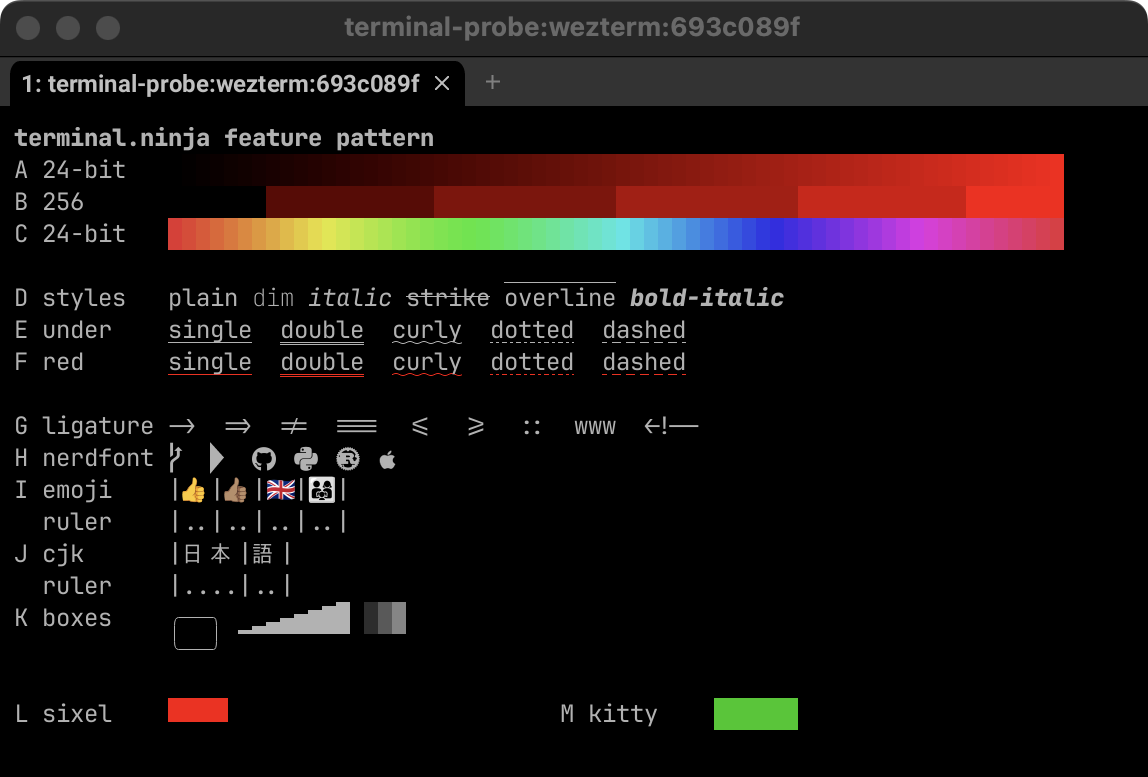
20260929-043349-cab25161What the gaps cost you
Section titled “What the gaps cost you”Which macOS terminals support truecolor?
Section titled “Which macOS terminals support truecolor?”Five of the six draw it; Terminal.app is the exception. This is the one most people notice.
Without it, every colour theme gets squeezed into a 256-colour palette, and a subtle background
becomes a slightly wrong one. If colours look off inside tmux or over SSH in a terminal that does support it, the cause is usually
$TERM, not the terminal.
Which macOS terminals support undercurl?
Section titled “Which macOS terminals support undercurl?”Styled underlines are how editors and linters mark spelling mistakes and errors: a red squiggle under the offending word. Alacritty, Ghostty, kitty and WezTerm draw every style, in colour. In iTerm2 the squiggle stays but the double, dotted and dashed styles become plain lines. In Terminal.app the whole word gets a coloured background instead.
Which macOS terminals support sixel and kitty graphics?
Section titled “Which macOS terminals support sixel and kitty graphics?”Images split terminals into two camps. Sixel is the old DEC format that image tools have supported for decades; the kitty graphics protocol is newer and more capable. Tools that show images in the terminal generally pick whichever the terminal speaks, so a terminal with neither gets text, or nothing.
Of these six, only iTerm2 and WezTerm draw sixel. Ghostty, kitty and WezTerm speak the kitty protocol; iTerm2 draws its images but at the wrong size. WezTerm is the only one that does both properly, and Alacritty and Terminal.app do neither.
Which macOS terminals get emoji width right?
Section titled “Which macOS terminals get emoji width right?”Emoji mostly work everywhere, until they’re combined. Skin tones, flags and families are built from several characters joined together, and a terminal that draws the pieces separately also gets the width wrong, which pushes everything after them out of line. Alacritty gets all three wrong; Terminal.app manages everything except flags, which it squeezes into one cell.
Which macOS terminals support OSC 8 hyperlinks?
Section titled “Which macOS terminals support OSC 8 hyperlinks?”OSC 8 lets a program print a clickable link with whatever text it likes, the way a web page does:
GNU ls --hyperlink turns file names into links to the files, and GCC links each warning to the
documentation for the option that raised it. A terminal that doesn’t support it prints the text and drops the link
without a word, so nothing breaks, but nothing is clickable either.
Five of the six support it. Alacritty, kitty and WezTerm underline a link as soon as the pointer is over it; Ghostty and iTerm2 show it only while Cmd is held, which is also what clicking it takes. Terminal.app shows no sign of the link at all.
Which macOS terminals support OSC 52 copying?
Section titled “Which macOS terminals support OSC 52 copying?”OSC 52 lets a program put text on your clipboard by asking the terminal to do it. That matters most over SSH, where the program has no other way of reaching your machine: it is how a yank in Neovim or a copy in tmux on a remote server ends up on your laptop’s clipboard.
Alacritty, Ghostty, kitty and WezTerm accept it as they come. iTerm2 supports it but has it switched off until you allow it in its settings, and Terminal.app ignores it.
Which macOS terminals support the kitty keyboard protocol?
Section titled “Which macOS terminals support the kitty keyboard protocol?”The keyboard encoding terminals inherited can’t tell Ctrl+I from Tab, Ctrl+[ from Escape, or Shift+Enter from plain Enter, because it sends the same bytes for each. The kitty keyboard protocol gives every key combination its own code, and editors such as Neovim and Helix switch it on when the terminal offers it. That is what makes those bindings work at all.
Alacritty, Ghostty, iTerm2 and kitty all offer it out of the box. WezTerm supports it but leaves it
off until you set enable_kitty_keyboard = true. Terminal.app doesn’t answer the question.
Which macOS terminals support synchronised output?
Section titled “Which macOS terminals support synchronised output?”A full-screen program such as an editor or tmux redraws the screen in pieces. Synchronised output lets it tell the terminal to hold off until the whole frame has arrived, so you never see half a redraw as flicker or tearing. Every terminal here supports it except Terminal.app, which doesn’t answer the question.
The other protocols
Section titled “The other protocols”The bottom of the table is protocols most people never meet by name, though their programs lean on them constantly. Each result is the terminal’s own reply, and Terminal.app ignores every one of these questions bar the colour query, so its cells are dashes rather than crosses: silence, not a confirmed no.
- Bracketed paste (mode 2004) marks pasted text as pasted, so a shell doesn’t run a pasted command at its first newline and an editor doesn’t auto-indent it into a staircase. The other five all support it.
- Focus events (mode 1004) tell a program when its window gains or loses focus, which is how Neovim notices a file changed behind its back. The other five all support them.
- SGR mouse reporting (mode 1006) is the mouse encoding modern programs use; the older one can’t report a click beyond column 223. The other five all support it.
- Grapheme clustering (mode 2027) gets the terminal and the program to agree that a combined emoji is one character, which is the cure for the emoji width problem. Ghostty and WezTerm support it. Alacritty, iTerm2 and kitty decline, though kitty draws combined emoji correctly anyway.
- The light/dark mode query, and change notices (mode 2031), let a program ask whether the terminal has a light or dark theme and hear when it switches, so an editor can follow the system appearance. Ghostty and kitty do both; Alacritty, iTerm2 and WezTerm ignore the query and decline the notices.
- In-band resize (mode 2048) reports window size changes as input, pixel size included, rather than leaving programs to catch a signal and ask. Ghostty, iTerm2 and kitty support it; Alacritty and WezTerm don’t.
- Colour queries (OSC 10/11) report the foreground and background colours, which is how Neovim decides whether your background is dark or light. All six answer, Terminal.app included.
- XTVERSION reports the terminal’s name and version, a more honest answer than
$TERM. XTGETTCAP answers terminfo questions directly, useful on a remote host that has never heard of the terminal. Ghostty, iTerm2, kitty and WezTerm answer both; Alacritty answers neither.
Which terminal to pick
Section titled “Which terminal to pick”The matrix says what each terminal does, not which one to live in. For that, see the terminal emulator roundup, or the head-to-heads: Ghostty vs iTerm2 and Alacritty vs kitty. The ligature and icon rows are really about fonts, which the fonts guide covers properly.