
tmux Cheat Sheet: Keys and Commands
A reference, not a tutorial. If you want the mental model — what a session actually is, why the prefix exists, and a config worth stealing — read the tmux tutorial first and come back here when you need the keys.
Everything below is a tmux 3.5 default, checked against a server started with no config at
all. If a key does something else on your machine, your ~/.tmux.conf is the prime suspect, and
prefix then ? will tell you what it did.
How to read this
Section titled “How to read this”prefix means Ctrl+B, pressed and released, then the key in the table. It is not a chord.
Ctrl+B c is two separate motions, which is why tmux feels slow for a fortnight and then
doesn’t.
Keys marked repeatable can be pressed again on their own within about half a second, so
prefix Ctrl+Left Ctrl+Left Ctrl+Left shrinks a pane three columns without three prefixes.
To practise on the factory defaults, start tmux with no config at all, here or in the Linux playground:
tmux -f /dev/null newThe ten worth learning first
Section titled “The ten worth learning first”Learn these and you can stop reading. The rest is for the day you need it.
| Keys | Effect |
|---|---|
prefix d |
Detach — leave everything running |
prefix c |
New window |
prefix 1–9 |
Jump to window by number |
prefix % |
Split left/right |
prefix " |
Split top/bottom |
prefix arrow |
Move between panes |
prefix z |
Zoom this pane full-window, and back |
prefix [ |
Copy mode — scroll the scrollback |
prefix w |
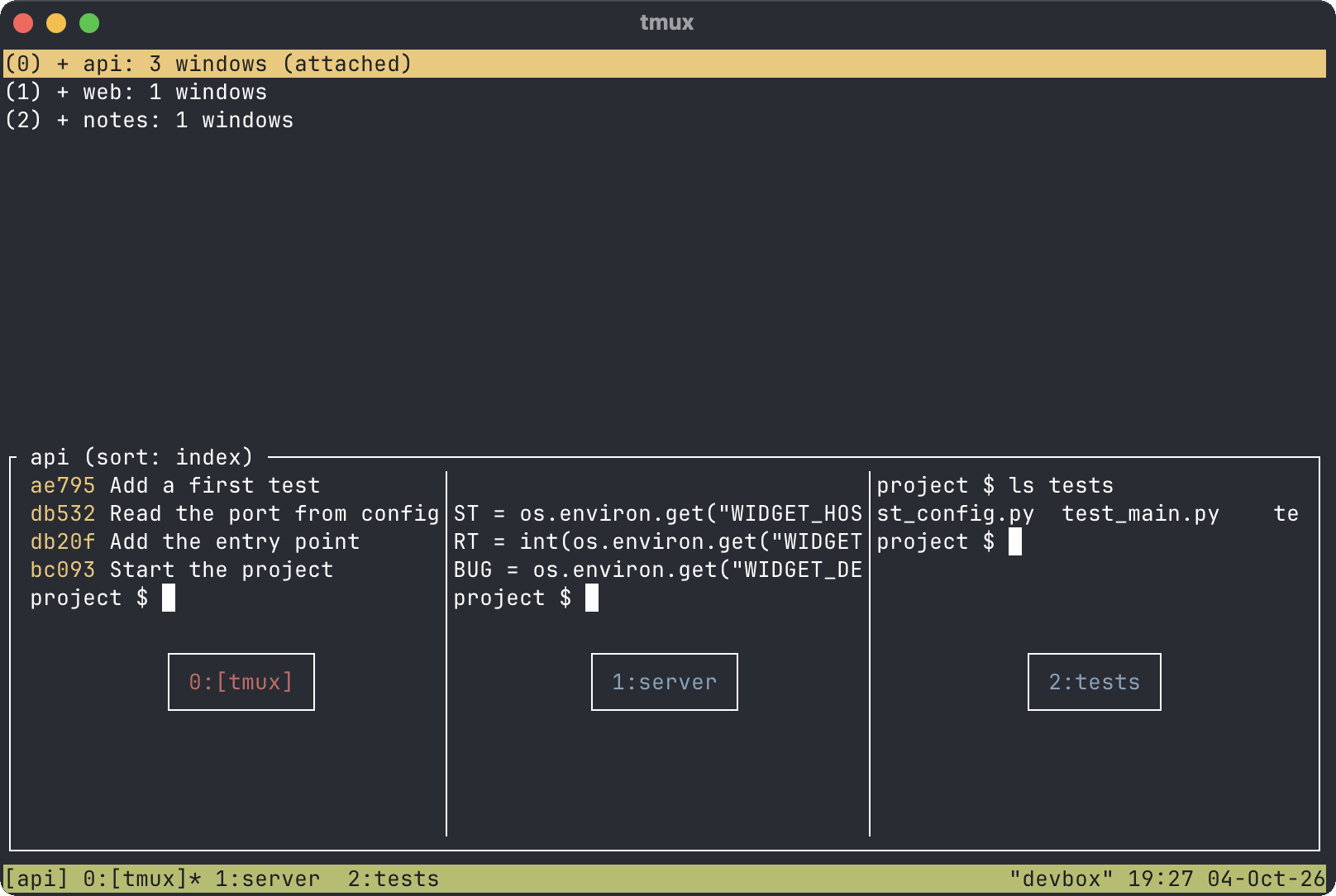
Interactive picker of every session and window |
prefix ? |
List every binding, including the ones you rebound |
Sessions, from the shell
Section titled “Sessions, from the shell”The commands you type before tmux is running, or from a pane when you fancy being literal.
| Command | Effect |
|---|---|
tmux |
Start an unnamed session |
tmux new -s work |
Start a session called work |
tmux new -s work -n editor |
…with its first window named editor |
tmux ls |
List sessions |
tmux attach -t work |
Attach to work (tmux a -t work in practice) |
tmux attach -d -t work |
Attach, detaching whoever else is looking |
tmux new -A -s work |
Attach if it exists, create it if it doesn’t |
tmux kill-session -t work |
End that session |
tmux kill-server |
End all of them, and the server |
tmux source-file ~/.tmux.conf |
Reload the config into a running server |
tmux new -A -s work is the one to put in a shell alias or an SSH command: it is the same
keystroke whether or not the session is already there, which means no more tmux ls, squint,
tmux attach dance on a box you visit twice a month. Pair it with a
host entry in ~/.ssh/config and reconnecting to a long job is one word.
Sessions, from inside
Section titled “Sessions, from inside”| Keys | Effect |
|---|---|
prefix d |
Detach |
prefix $ |
Rename the current session |
prefix s |
Tree of sessions and windows, navigable |
prefix ( / ) |
Previous / next session |
prefix L |
Back to the last session you were in |
prefix D |
Choose which client to detach |
prefix Ctrl+Z |
Suspend the tmux client itself (fg to return) |
Windows
Section titled “Windows”Windows are tabs. They fill the whole terminal and hold panes.
| Keys | Effect |
|---|---|
prefix c |
New window |
prefix , |
Rename this window |
prefix & |
Kill this window (asks first) |
prefix n / p |
Next / previous window |
prefix 0–9 |
Jump straight to that number |
prefix ' |
Prompt for a window index — for when you have more than nine |
prefix l |
Back to the last window |
prefix w |
Pick from a tree of everything |
prefix f |
Search windows by the text on screen |
prefix . |
Renumber this window |
prefix < / > |
Menu of window / pane actions |
prefix f is badly underused: it searches the visible content of every window, so “which
window was the failing test in” is a question you can answer rather than hunt.
| Keys | Effect |
|---|---|
prefix % |
Split left and right |
prefix " |
Split top and bottom |
prefix arrow |
Move to the pane in that direction |
prefix o |
Cycle to the next pane |
prefix ; |
Back to the last pane |
prefix q |
Flash pane numbers; press one to jump there |
prefix z |
Zoom / unzoom |
prefix x |
Kill this pane (asks first) |
prefix ! |
Break this pane out into its own window |
prefix Space |
Cycle through the built-in layouts |
prefix Ctrl+O |
Rotate the panes through the layout |
prefix { / } |
Swap this pane with the previous / next one |
prefix m |
Mark this pane (for join-pane and friends) |
Resizing
Section titled “Resizing”| Keys | Effect |
|---|---|
prefix Ctrl+arrow |
Resize by one cell — repeatable |
prefix Alt+arrow |
Resize by five cells — repeatable |
prefix Alt+1 … Alt+5 |
even-horizontal, even-vertical, main-horizontal, main-vertical, tiled |
prefix E |
Spread the panes out evenly again |
prefix Alt+5 (tiled) is the “I have made a mess of this” key. prefix E is the gentler
version that keeps your layout and just evens the sizes.
Copy mode
Section titled “Copy mode”prefix [ enters copy mode; q leaves it. This is also how you scroll: tmux owns the
scrollback, so your terminal’s own scrollbar is looking at the wrong thing.
The default bindings are Emacs-style, matching the readline keys your shell already uses:
| Keys | Effect |
|---|---|
Ctrl+Space |
Start selecting |
Alt+W |
Copy the selection and leave |
Ctrl+G |
Clear the selection |
Ctrl+S / Ctrl+R |
Incremental search down / up |
n / N |
Next / previous match |
Ctrl+A / Ctrl+E |
Start / end of line |
Alt+B / Alt+F |
Back / forward a word |
Alt+< / Alt+> |
Top / bottom of the history |
g |
Go to line number |
Ctrl+V / Alt+V |
Page down / up |
R |
Toggle rectangle (column) selection |
q or Escape |
Leave copy mode |
Then prefix ] pastes the buffer back, prefix # lists every buffer you have accumulated,
and prefix = lets you pick one.
If you set mode-keys vi
Section titled “If you set mode-keys vi”setw -g mode-keys vi swaps the lot for Vim motions — h j k l, w b, / and ? to
search, G and g for the ends. Two defaults surprise almost everyone:
| Keys | What it actually does |
|---|---|
Space |
Start selecting — not v |
v |
Toggle rectangle selection |
Enter |
Copy and leave — not y |
So the v / y muscle memory every Vim user arrives with is wrong in both halves. The
customary fix, and it is customary for a reason:
setw -g mode-keys vibind -T copy-mode-vi v send-keys -X begin-selectionbind -T copy-mode-vi y send-keys -X copy-selection-and-cancelbind -T copy-mode-vi C-v send-keys -X rectangle-toggleThe command prompt
Section titled “The command prompt”prefix : opens tmux’s own command line, which is where anything without a key binding lives.
Everything in ~/.tmux.conf is a command, so anything you can configure you can also type once
to try it.
| Command | Effect |
|---|---|
:new-window -n logs |
New window, named up front |
:rename-session api |
Rename without the prompt |
:swap-window -t 1 |
Move this window to position 1 |
:join-pane -t :2 |
Pull this pane into window 2 |
:break-pane |
The reverse: pane becomes its own window |
:setw synchronize-panes on |
Type once, into every pane at once |
:set mouse on |
Mouse scrolling and pane selection, right now |
:list-keys -T copy-mode-vi |
What a key table actually contains |
:show-options -g |
Every global option and its current value |
:source-file ~/.tmux.conf |
Reload the config |
Finding a key you’ve forgotten
Section titled “Finding a key you’ve forgotten”| Keys | Effect |
|---|---|
prefix ? |
Every binding, with descriptions, searchable |
prefix / |
Press a key; tmux says what it is bound to |
prefix i |
Show the current window’s status message |
prefix ~ |
The server’s message log, for when something silently didn’t happen |
prefix C |
Interactive options browser (tmux 3.2 and later) |
prefix ? is the honest answer to this entire page. The difference is that it lists your
bindings, including the ones you rebound and forgot about, which is a different and often more
useful question than what tmux ships with.
Config lines worth knowing
Section titled “Config lines worth knowing”Not a config — the tutorial has one of those. These are the specific lines people come looking for:
# Prefix on Ctrl+A instead, the traditional swapset -g prefix C-aunbind C-bbind C-a send-prefix
# Start counting at 1, and close the gaps when a window diesset -g base-index 1setw -g pane-base-index 1set -g renumber-windows on
# Scrollback worth havingset -g history-limit 50000
# Mouse: scroll, click panes, drag bordersset -g mouse on
# Don't make Vim wait to find out whether Escape was a meta keyset -sg escape-time 10
# Reload without leavingbind r source-file ~/.tmux.conf \; display "Config reloaded"
# Tell tmux the outer terminal can do 24-bit colourset -as terminal-features ",xterm-256color:RGB"
That last line is the fix for muddy, banded colour inside tmux, and the pattern must match the
TERM of the terminal tmux is running in. The guide to fixing truecolor in tmux explains why
COLORTERM does nothing here, whatever the internet says.
Moving the prefix to Ctrl+A costs you readline’s jump-to-start-of-line inside tmux — press the
prefix twice to send a real Ctrl+A through. Whether that trade is worth it depends mostly on
where your keyboard puts Ctrl, and some of them put it
somewhere far better than others.
Keeping it
Section titled “Keeping it”A cheat sheet you have to look up is a cheat sheet you will stop looking up. Once your
~/.tmux.conf has the half-dozen lines you actually want,
put it in a git repository with the rest of your dotfiles so the
next machine starts where this one left off.
If all of this still feels like a lot to memorise, that is a fair complaint and the reason Zellij exists — it puts the keys on screen instead of on a page like this one. It also, for now, loses on the thing that matters most, which the comparison covers.
And if you are reaching for tmux only because your terminal has no tabs, check whether it does — several in the roundup handle splits natively, and kitty will do layouts without a multiplexer at all. tmux earns its place on the far end of an SSH connection; locally it is a choice rather than a necessity.