
Terminal Test: Check What Yours Supports
Every terminal’s website says it supports everything. Your terminal, your font, your tmux config
and the TERM variable you set in 2019 and never looked at again may have other ideas. One
command settles it:
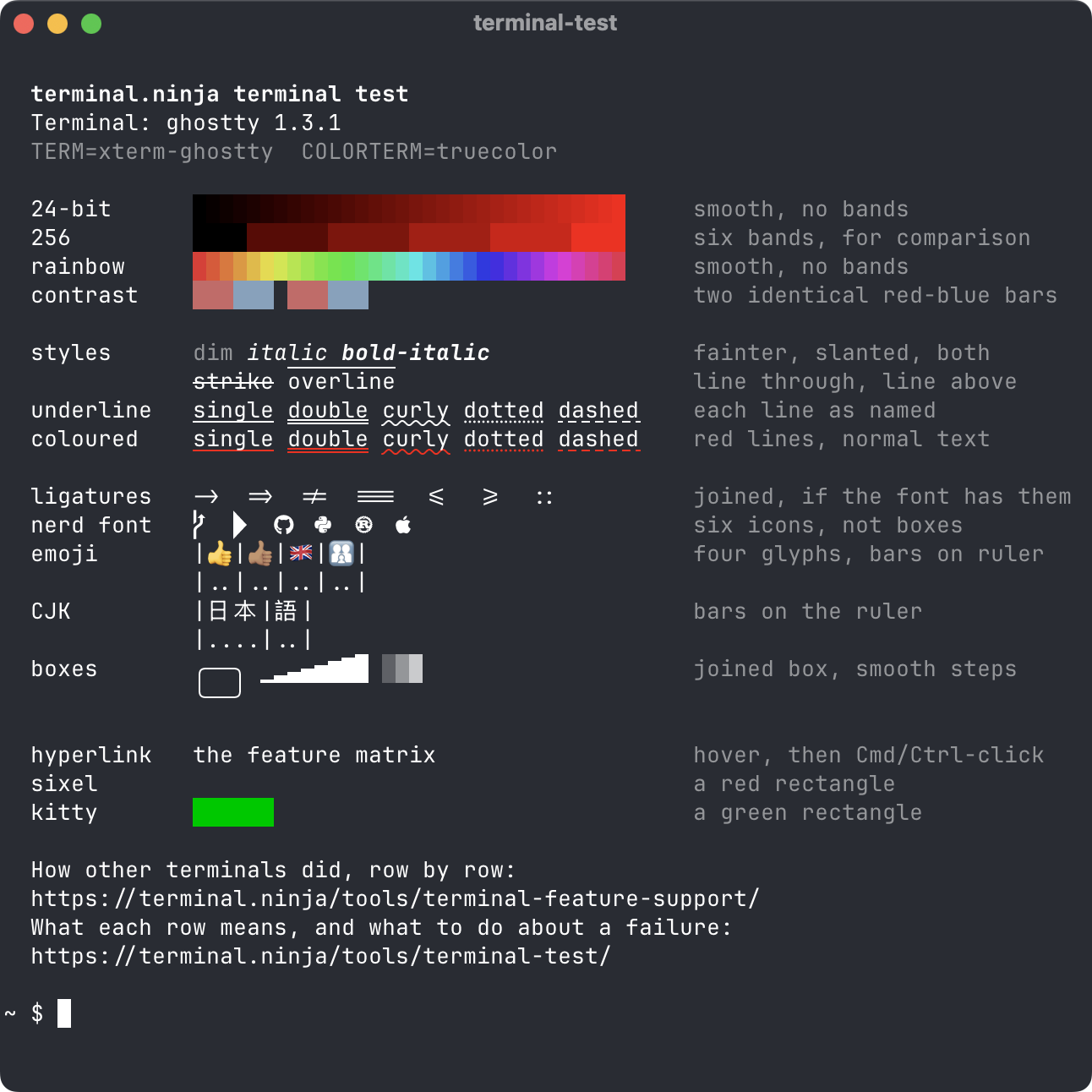
curl -sSf https://terminal.ninja/terminal-test.sh | shIt draws one row per feature, with what you should see printed beside it in grey: 24-bit colour, text styles, every underline style, ligatures, Nerd Font icons, emoji, CJK text, box drawing, a hyperlink and two small images. A row that doesn’t match its description is a row your setup gets wrong. At the bottom it links to the feature matrix (Linux version), where a dozen other terminals ran the same rows on factory settings, so you can see whether it’s your terminal or your configuration.
Piping a stranger’s script into your shell is a habit worth having doubts about. If you’d rather read it first, which is the correct instinct:
curl -sSfO https://terminal.ninja/terminal-test.shless terminal-test.shsh terminal-test.shIt is just over two hundred lines of plain POSIX sh with nothing to install. Besides printing, it
does exactly one thing: it asks the terminal its name and version, and reads the reply from
/dev/tty. No network, no files written, nothing near your clipboard.
The header
Section titled “The header”Terminal is the terminal’s own answer to the XTVERSION query. Alacritty and Terminal.app
don’t answer it; for those the script falls back to $TERM_PROGRAM, and failing that admits it
was told nothing. Inside tmux, tmux answers on its own behalf, which is your first clue that what
follows describes tmux as much as the terminal underneath.
TERM and COLORTERM are what programs believe about the terminal, which is not the same as
what it can do. COLORTERM=truecolor is how bat, Neovim and a
good many others decide whether to use 24-bit colour at all. If the colour ramps below are smooth
but your editor’s theme still looks like it was printed on a tea towel, the terminal is fine and
the variables are lying: the truecolor guide takes that
apart layer by layer.
Colour
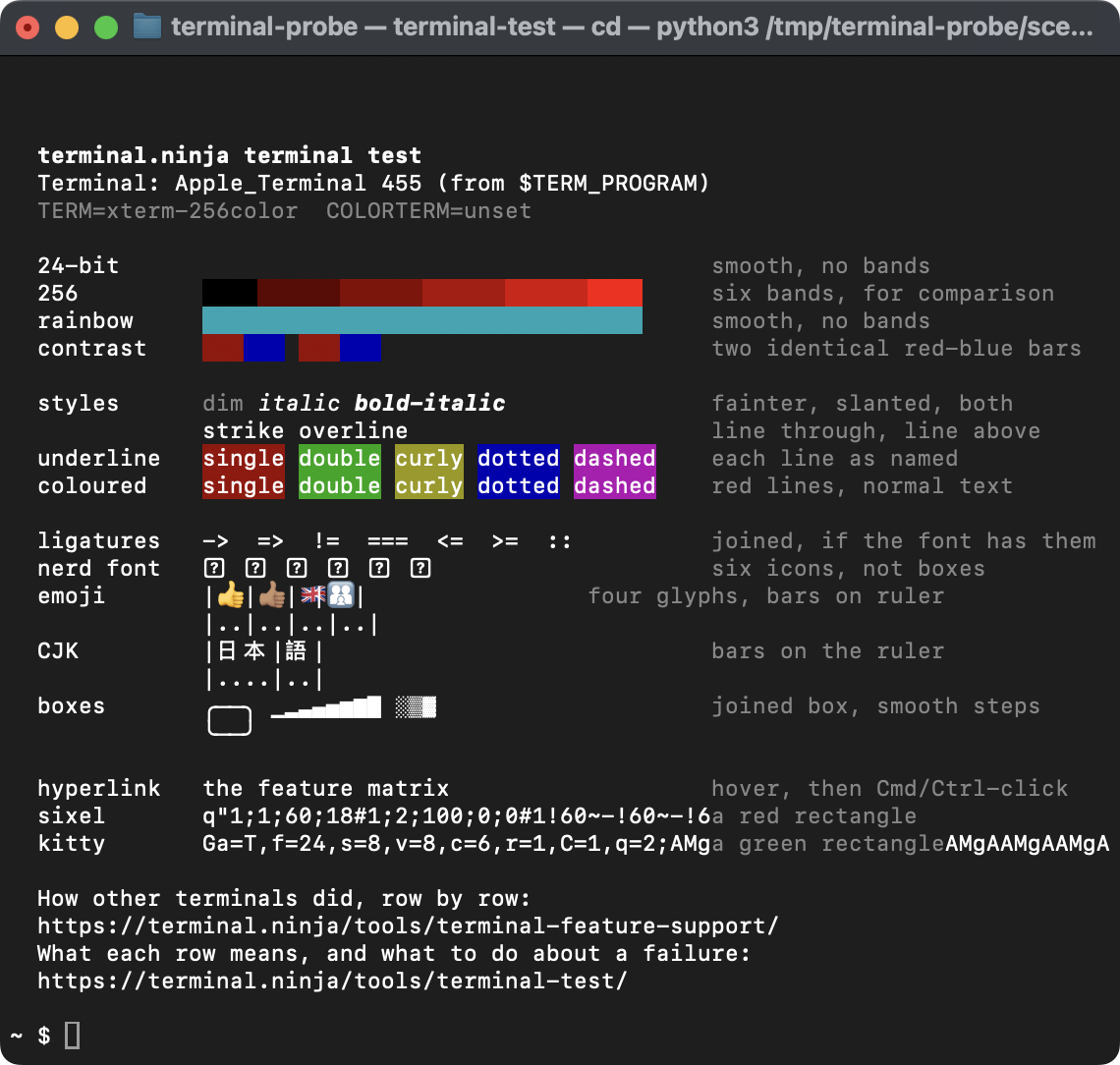
Section titled “Colour”24-bit and rainbow should be smooth. 256 is the same red ramp rounded to the 256-colour palette, there for comparison: six flat bands. If the 24-bit ramp looks like the 256 one, something between the script and the screen is rounding every colour, and inside tmux it is almost always tmux (below). If the 24-bit row is missing altogether and the rainbow is one flat teal stripe, you are in Terminal.app, which doesn’t do 24-bit colour and reads the codes as something else entirely.
Contrast draws red and blue bars twice: once in named colours, the sixteen your theme defines, and once as the same colours by number. Both pairs should look identical. Some terminals adjust named colours to keep text readable against its background, which is kind to text and ruinous to anything drawn in coloured blocks: fetch-tool logos, image previews, pixel art. Warp does it by default (Settings → Appearance → Enforce minimum contrast); iTerm2 has a Minimum contrast slider under Profiles → Colors, which ships at zero. The matrix row has the rest.
Text styles and underlines
Section titled “Text styles and underlines”dim, italic and bold-italic should be fainter, slanted, and both. Italic that comes out upright is usually the font: a family installed without its italic faces leaves the terminal nothing to draw with. strike and overline want a line through and a line above.
The underline row matters more than it looks. Neovim marks diagnostics with curly underlines, and coloured ones at that, so a terminal that flattens them gives you the same plain line under an error, a warning and a spelling mistake. iTerm2 draws dotted, dashed and double as plain underlines; Warp turns every style into a plain one. Terminal.app reads the codes as background colours, so the row arrives as five coloured blocks, which is at least unambiguous.
Characters
Section titled “Characters”Ligatures join ->, => and friends into single glyphs if your font has them and your
terminal draws them. Plenty of people switch them off on purpose, so a failure here may be a
preference rather than a fault; the fonts guide
covers both directions.
Nerd font should show six icons. Question marks or empty boxes mean no font in the chain has them. Ghostty, kitty and WezTerm ship the symbols themselves and pass this row on factory settings; everything else needs a Nerd Font, and the fonts guide explains which of the three variants to install and why the answer is usually none of them.
Emoji and CJK each sit above a ruler. Each emoji and each CJK character should take two cells, so the bars line up with the ruler beneath. The emoji row is four tests: a thumbs up, a toned thumbs up, a Union flag and a family of three joined into one glyph. Terminals disagree about the last three surprisingly often. When the bars drift, the terminal and your programs have different ideas about how wide a character is, and the symptom elsewhere is a prompt whose cursor sits a cell or two away from where you are typing.
Boxes should join up with no gaps, the block ramp should rise in even steps, and the three shades should get denser left to right. Gaps between rows of box-drawing characters usually mean a line-height setting above 1, in a terminal that takes the glyphs from the font rather than drawing them itself.
Hyperlinks and images
Section titled “Hyperlinks and images”Hyperlink is an OSC 8 link: text that is a link, rather than a URL the terminal noticed. GNU
ls --hyperlink and gcc emit them, and delta will if asked.
Hover over it, then Cmd-click on a Mac or Ctrl-click elsewhere. On macOS, Ghostty and iTerm2 only
show the link while Cmd is held, and Konsole ignores OSC 8 until Allow escape sequences for links is switched on in
the profile, so “nothing happened” deserves a second try before you believe it.
Sixel and kitty each draw a small rectangle, red and green, using the two image protocols
that terminal image viewers such as chafa, timg and the file manager yazi rely on. WezTerm
and Konsole draw both; Ghostty, kitty and Warp only the kitty one; foot only sixel. Alacritty,
GNOME Terminal and Terminal.app draw neither, and either ignore them or, in Terminal.app’s case,
print the image data on screen as text:
Inside tmux
Section titled “Inside tmux”Run the test in a bare terminal first, then inside tmux. Any row that changes is tmux’s doing.
tmux redraws everything itself and only sends the outer terminal what it has been told that
terminal understands. Your terminal’s terminfo entry tells it some of that, and
terminal-features tells it the rest:
| Row | Declare it with |
|---|---|
| 24-bit | RGB |
| Underline styles and coloured underlines | usstyle |
| Overline | overline |
| Hyperlink | hyperlinks |
| Sixel | sixel, in a tmux built with sixel support (3.4 and later) |
| kitty | Nothing: the script’s image only gets through tmux wrapped for its passthrough, which it isn’t |
Try them on the command line before committing them to your config:
tmux -T RGB,usstyle,overline,hyperlinks new-sessionIf the rows come back, keep them, with the pattern matching the TERM of the terminal tmux runs
in:
set -as terminal-features ",xterm-256color:RGB:usstyle:overline:hyperlinks"Only declare what the bare terminal actually passed. Telling tmux your terminal can do something it can’t is how the gradient turns into garbage rather than bands. The truecolor guide’s tmux section covers the colour half in more depth, and why the line everyone copies is mostly cargo.
Over SSH, the script still draws in your own terminal, so the rows look the same as they do
locally; what changes is TERM, and whether the server has a terminfo entry for it. If the test
looks right over SSH and your programs there don’t, that’s the
missing terminfo problem,
not your terminal.
What it doesn’t test
Section titled “What it doesn’t test”Features that don’t draw anything: the kitty keyboard protocol, synchronised output, focus events, bracketed paste and the light/dark mode queries. A terminal can only be asked about those, and the matrix records each terminal’s answers. Nor does it copy anything to your clipboard to see whether OSC 52 works: writing to someone’s clipboard uninvited is rude, even in the name of science.
It also tests your terminal with your font and settings, which is the point. If a row fails and the matrix says your terminal passes it on factory settings, the difference is something you changed, and the matrix’s footnotes often say what.
The script is MIT-licensed. Take it, change it, put it in your dotfiles; the URL at the top of this page will keep serving the current version.